You already pay for more than one AI. WhileAI takes the prompt you type in one of them and sends it to the others, in the tabs and accounts you already have. Then it tells you when each answer is in.
Write in whichever AI you were going to use anyway. The others get the same prompt, each in its own tab, one at a time, at human pace.
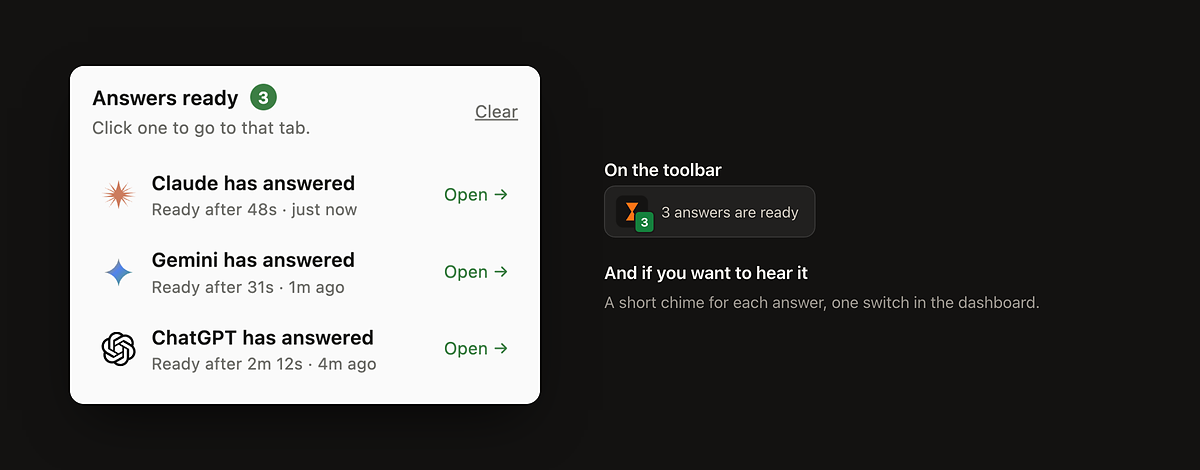
The popup lists every answer that landed while you were elsewhere, the toolbar icon counts them, and a chime and a notification tell you.
Writing, waiting and reading time per AI, which one is fastest on your own prompts, and which subscription you are paying for but not using.
Four steps, and you only do the first one.
Nothing to configure. WhileAI uses the tabs and accounts you already have, so it never asks for a password or an API key.
One switch per AI in the extension panel. An AI you leave off receives nothing.
Write it in whichever AI you were going to use anyway. The same text goes to the others, each in its own tab, one at a time.
Type the next prompt whenever you like. If an AI is still answering, it does not get the new one, and WhileAI tells you which AI missed it.
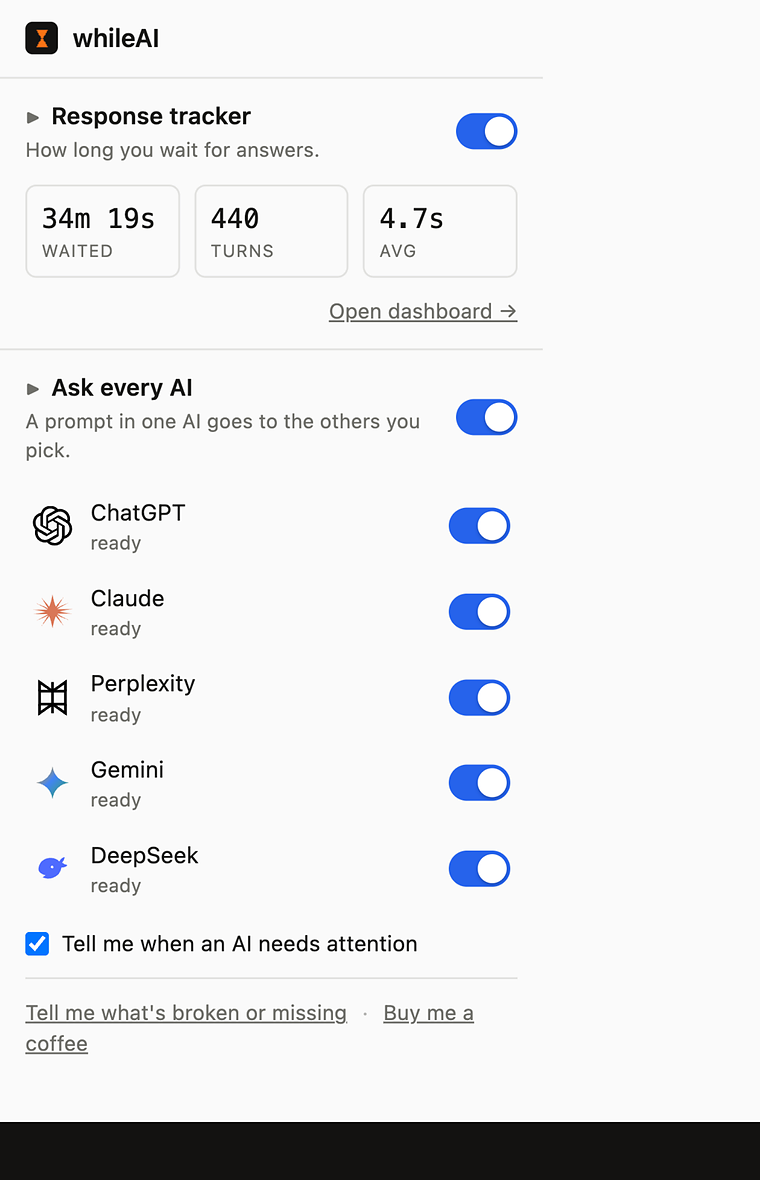
One switch per AI. If a prompt does not get through to one of them, the panel says which AI missed it, so a prompt never disappears quietly.
There is no new chat window to learn. You keep using ChatGPT, Claude and the rest exactly as they are, with their files, projects and modes.
That is where the name comes from. Start a prompt, switch to your real work, and get called back when the answer lands.
Every minute in an AI tab is one of three things: writing the prompt, waiting for the answer, or reading it. WhileAI measures all three, from timing alone. The measuring never looks at what you type or what the AI writes.
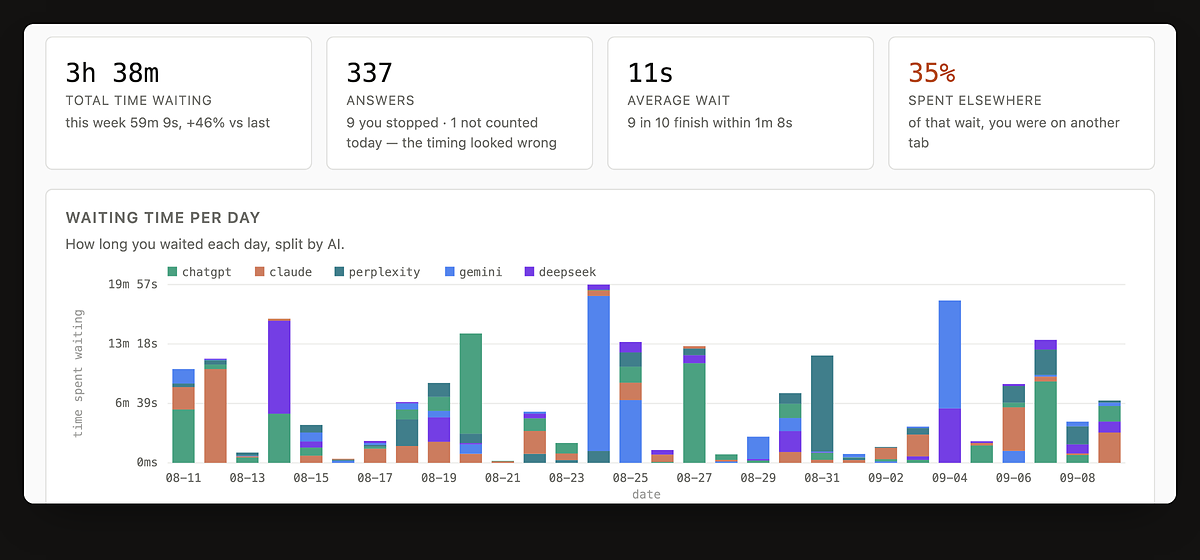
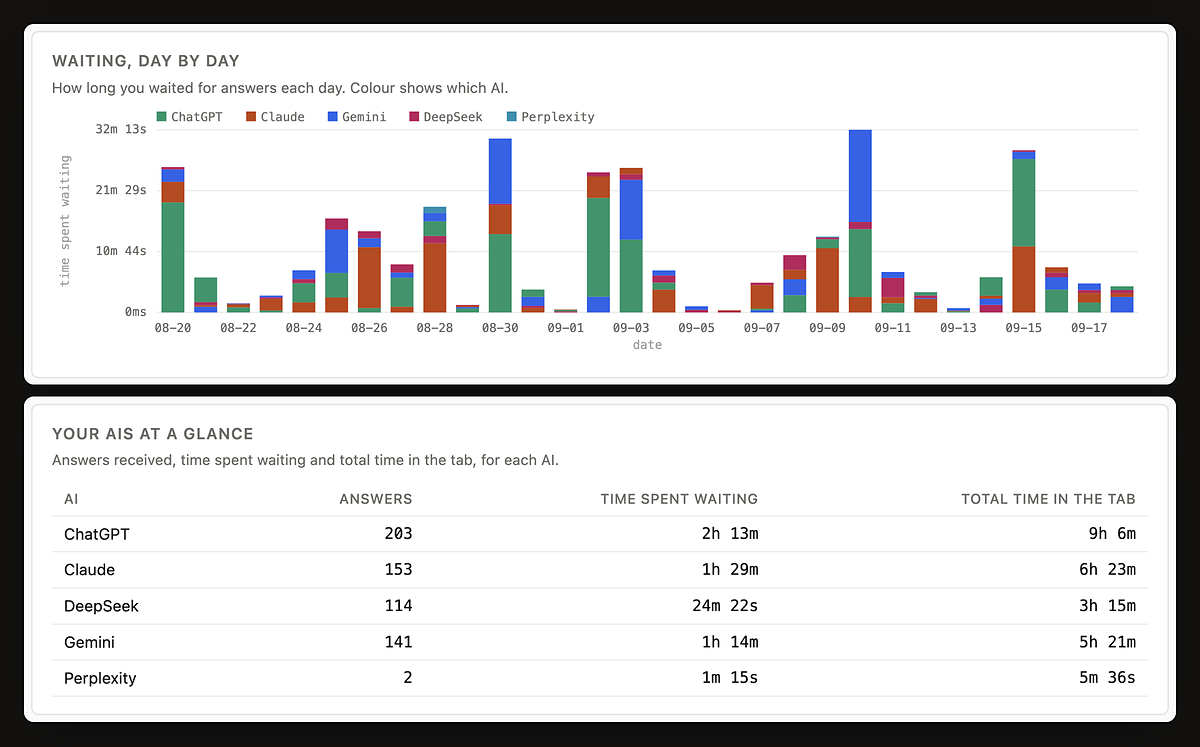
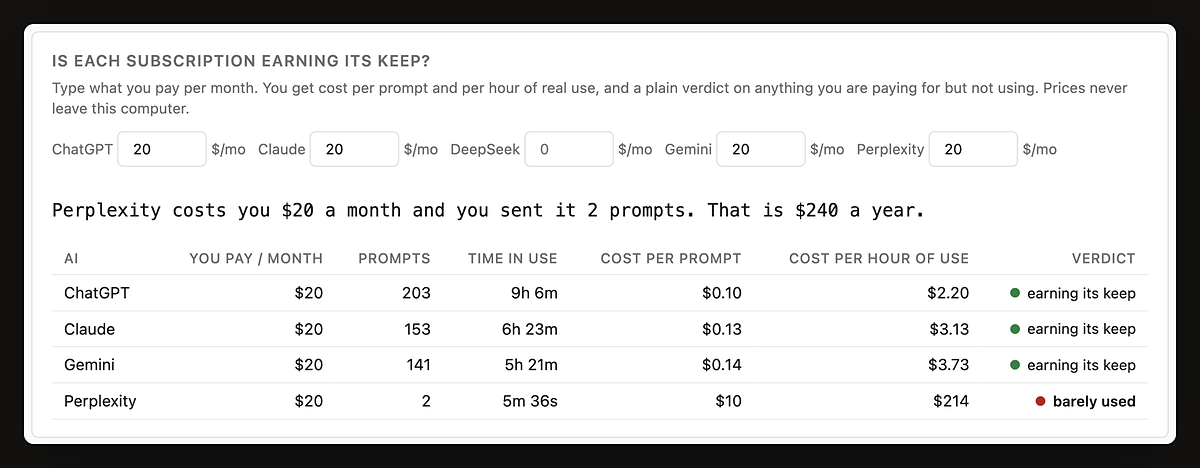
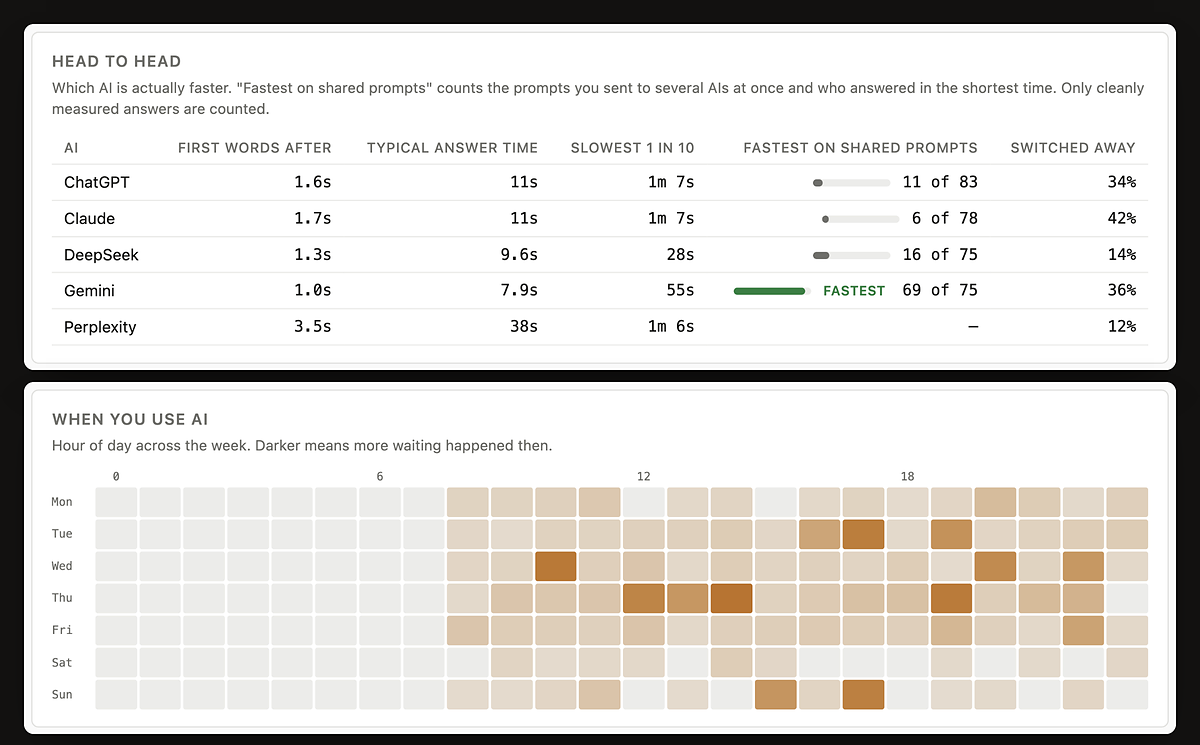
Once a few weeks of measurement exist, the dashboard stops being a set of totals and starts settling arguments. Each of these is a real section of it, worked out from timing and message counts alone.
Follow-up counts, the head to head, the heatmap and the subscription costs are all included, like everything else.
There is no paid plan. Every AI you switch on, your whole history, what each subscription costs you and every comparison are included, with no time limit and no cap on prompts.
An extension asks for trust before it has earned any, so this is written out in full.
chrome://extensions → WhileAI → Remove.
Its stored data goes with it. Pausing is the same page's toggle.WhileAI is an independent extension. It is not affiliated with, endorsed by, or connected to OpenAI, Anthropic, Google, Perplexity or DeepSeek; their names are used only to say which sites it works on.
The ones people actually ask. If yours is not here, write to me.
Yes. Every AI tab is timed on its own, at the same moment, including the ones in the background that you are not looking at. If you send one prompt to four AIs, you get four separate timings.
The dashboard shows this two ways, because they are different questions. Time spent waiting adds up every AI's wait. Under it, on the clock merges the waits that overlapped. Four AIs that each take 10 seconds, all at once, is 40 seconds of waiting and 10 seconds on the clock. The first tells you how much answering you asked for; the second is how long you actually sat there.
Yes, that is the normal case. Your prompt is delivered to tabs you are not looking at, and the answers-ready list tells you when each one has answered. Chrome slows background tabs down a great deal; WhileAI times its own steps on a clock Chrome does not slow, so a tab you have not touched for an hour still receives the prompt straight away.
The WhileAI popup has an Answers ready list at the bottom: one line per answer that landed while you were not looking at that tab, naming the AI and how long it took. Click a line and you are in that conversation, and the line goes away. The toolbar icon shows the same count in green, up to "9+". You also get a short chime and a desktop notification naming the AI (one per AI at a time; click it and you are in that tab). Both sit under one switch in the dashboard, on by default, with a "Test" button next to it. The list and the count do not depend on it, because the operating system can swallow a notification without telling anyone.
An amber badge means a prompt did not get through to one of your AIs. The popup then shows one line, "X did not get this prompt. Open the X tab: it may be signed out, still answering, at a usage limit, or showing a check." Click it to open that tab. It clears itself once a prompt reaches that AI again. Amber wins over green, because a missed prompt is worth more of your attention than a finished answer.
No. DeepSeek remembers those two buttons from your last visit, and a slow thinking mode is rarely what you want when the same prompt is going to several AIs. Before WhileAI types a prompt there on your behalf it switches both off, the same click you would make, so the prompt goes out in the standard mode. It only does this on prompts it delivers, never while you are typing in DeepSeek yourself.
No. There is one switch per AI and an AI that is off receives nothing. Closing an AI's tab switches it off too.
Writing is the time keys are being pressed in the message box. Waiting is from the moment you send until the answer stops arriving. Reading is time with the tab in front, the window focused, and some sign of life from you in the last minute. All three come from timing alone. WhileAI never reads what you type or what the AI writes, and a tab left open overnight does not count as eight hours of reading.
The share of your waiting that you spent on something else instead of watching the answer appear. A higher number is better. It only counts answers in tabs you were using yourself; prompts delivered to background tabs are left out, because "you left the tab" means nothing for a tab you were never in.
It will not judge a subscription on less than 14 days of use. Until then it shows what each prompt has cost you so far, scaled from the days it has. After two weeks it says which subscriptions are earning their keep and which you have barely opened.
The AI sites change their pages often. WhileAI checks itself, and when a site changes, a fix is usually published within hours and installs on its own, with no store update. Reloading the AI tab picks it up. If it has not come back by the next day, write to me.
To send something concrete: the dashboard has "Something not working? Send a diagnostic report" under Your data. Turn it on, do the thing that fails, then download the file and attach it. It records which AI and which step failed, never your prompts or answers. The popup also has a "Report a problem" link that fills in the version and which AIs you had switched on.
Chrome, and browsers that install from the Chrome Web Store such as Edge, Brave and Arc. ChatGPT, Claude, Gemini, Perplexity and DeepSeek. It runs on those five sites only and asks for no "all sites" access. Every permission it asks for, and what each one is for, is listed on the privacy page.
Neither. It works inside the tabs you are already signed in to, the same way you would: it puts the text in the box and presses send. It never sees a password, and there is nothing to configure.
WhileAI does by machine what you would do by hand in your own account, one prompt at a time, at human pace. It does not solve CAPTCHAs, get around usage limits or hide what it is. When a site puts up a check or a limit, that AI does not get the prompt and WhileAI tells you. Each provider's terms are still yours to follow, and none of them is affiliated with WhileAI.
Nothing. WhileAI is free, with every feature: every AI you switch on, your whole history and all the analysis. There is no paid plan. Anyone who bought Pro before October 2026 keeps everything, with nothing more to pay.
 Ahmet Aytar